For Kickstarter creatorsJoey · Discord community architect

Your campaign brings backers in. Give them a place to land.

A Discord where backers unlock their backer-only spaces with the code from your backers-only update, reach support without posting purchase details in public, and see their feedback go somewhere — handed over to your team with documentation.

Not quite you? Game studios · Agencies · See the full site

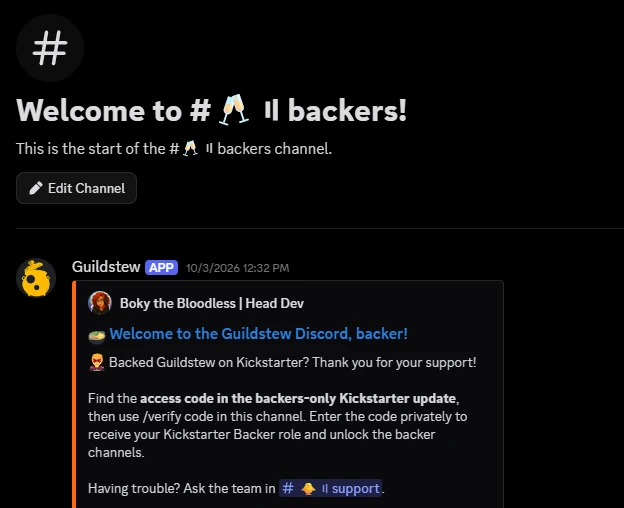
The backers channel: instructions to find the access code in the backers-only Kickstarter update and verify privately
Client projectGuildstew · delivered October 2026

A Discord built for Guildstew’s Kickstarter community.

  • Code-based access: backers enter the code from the backers-only Kickstarter update, privately
  • Two ticket routes — General Support and Commerce Desk — with a dedicated support role
  • Handed over with a staff playbook and a reusable 14-day engagement plan

“Honestly if you need help setting up online server communities, my slavic brother from another mother here is truly the best you could ever get.”

Bojana “Boky” MilenkovicCEO, Aetherian Studios · on LinkedIn, launch day
Read the Guildstew case study
01What you get

Everything backers need after they pledge.

Access

Code-based backer access

Backers enter the code from your backers-only Kickstarter update to unlock the backer-only spaces. It checks the code, not the pledge itself, so the code should only ever appear in backer-only updates.

Support

A support desk

General support and commerce tickets kept out of public channels, with a support role that sees both queues.

Onboarding

A clear way in

Interest-based onboarding and a Server Guide, so a backer who joins mid-campaign knows where to go.

Feedback

Feedback with a status

Bug-report and suggestion forums with status tags, so backers can see what happened to what they reported.

Team

Staff & handoff

Moderation commands, escalation, appeals and lockdown procedures documented for your team.

After the campaign

A reason to stay

A reusable 14-day engagement plan — conversations, events and community contributions — for the weeks after the rush.

02How I workNo surprises

3 steps, agreed before anything is built.

  1. 01

    Review

    I look at your campaign, your timeline and where backers will come from.

  2. 02

    Agreed scope

    A written scope — verification, backer spaces, support, onboarding and staff — agreed before I build.

  3. 03

    Build or manage

    I build it before the rush and hand it over with documentation, or stay on and run it with your team.

03More proof
Site-202 internal department structure My own community — not a Kickstarter projectSite-202 “New World” · founder · 2023 Six days of campaign before a single feature shipped. Then 4,000 messages on the first day.
4,000+messages on day one
100members in the first week
17public dev logs
Open the Site-202 case study
Working reference · Owner / founder of Aurora and Crimson

“Joey built the backbone of both my communities. On Aurora he took an empty server to thousands of messages a day and designed the onboarding, rules and events that kept it running. On Crimson he built and trained a staff team that ran itself after he moved on. He's who I'd trust with community structure.”

Mikey avatarMikeyOwner & Founder · Crimson Network / Project Aurora

Tell me about your campaign.

When it launches, how many backers you expect, and what they should find when they join. I’ll tell you how I would set it up.

Email
joey@joeyinsync.com
Call
calendly.com/joeyinsync
Discord
joeyinsync
Status
Open for work